
Project Information
- Category: AWS / Web Application
- Project date: July 2024
AWS End-to-End Web Application Project
Project Overview
This project applies skills from my Brainovision internship, using AWS services like Amplify, Lambda, API Gateway, and DynamoDB. I developed an end-to-end web application, incorporating serverless computing, API integration, and data storage.
Prerequisites
- A text editor.
- An AWS account.
- Basic knowledge of AWS.
Step-by-Step Guide
1. Create and Host a Web Page using AWS Amplify
Create a simple HTML page:
<!DOCTYPE html>
<html>
<head>
    <title>Math Application</title>
</head>
<body>
    <h1>Math Calculation</h1>
    <form id="mathForm">
        <input type="number" id="num1" placeholder="Enter first number">
        <input type="number" id="num2" placeholder="Enter second number">
        <button type="button" onclick="calculate()">Calculate</button>
    </form>
    <script>
        async function calculate() {
            const num1 = document.getElementById('num1').value;
            const num2 = document.getElementById('num2').value;
            const response = await fetch('YOUR_API_GATEWAY_URL', {
                method: 'POST',
                headers: {
                    'Content-Type': 'application/json'
                },
                body: JSON.stringify({ num1, num2 })
            });
            const result = await response.json();
            alert(`Result: ${result}`);
        }
    </script>
</body>
</html>
Deploying with Amplify
- Go to AWS Amplify in the AWS Management Console.
- Select "Host a web app."
- Connect your repository or upload the HTML file.
- Follow the instructions to deploy the app.
2. Use Lambda Function for Calculations
Create a Lambda function using Python:
import json
import math

def lambda_handler(event, context):
    num1 = event['num1']
    num2 = event['num2']
    result = num1 + num2  # or any other math operation
    return {
        'statusCode': 200,
        'body': json.dumps(result)
    }
3. Invoke Lambda Function with API Gateway
- Create a new API and select REST API.
- Create a new resource and method (POST).
- Integrate the method with the Lambda function.
- Enable CORS.
- Deploy the API.
4. Store Results in DynamoDB
Setup DynamoDB and update Lambda function with DynamoDB integration:
import json
import math
import boto3
from datetime import datetime

dynamodb = boto3.resource('dynamodb')
table = dynamodb.Table('YourDynamoDBTableName')

def lambda_handler(event, context):
    num1 = event['num1']
    num2 = event['num2']
    result = num1 + num2  # or any other math operation
    timestamp = datetime.utcnow().isoformat()

    table.put_item(Item={
        'id': str(uuid.uuid4()),
        'result': result,
        'timestamp': timestamp
    })

    return {
        'statusCode': 200,
        'body': json.dumps(result)
    }
5. Test and Deploy the Application
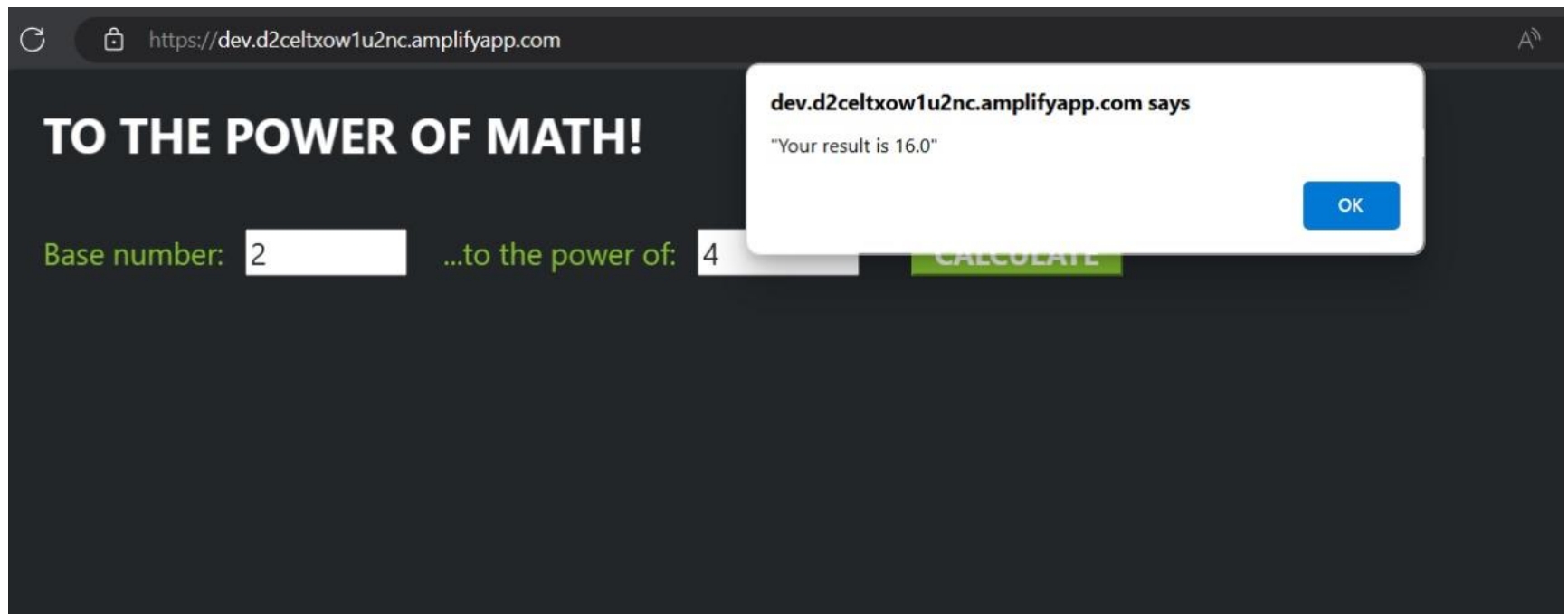
- Open the deployed web page.
- Enter numbers into the form and click "Calculate."
- Verify the result is correct and displayed in an alert pop-up.
- Redeploy with updates as needed.
6. Clean Up Resources
Delete the following resources to avoid unnecessary costs:
- DynamoDB table.
- Lambda function.
- API Gateway.
Conclusion
By following these steps, you have successfully built, deployed, and tested an end-to-end web application using AWS services. This project demonstrates how to integrate various AWS components to create a functional and efficient web application.